From Manual Chaos to Codified Truth: Why Your Dockerfile is Actually Your Best Documentation
The Silent Killer: Documentation Rot
In the world of software development, documentation rot is a silent killer. We've all been there: you follow a 10-step installation guide only to realize at step 7 that the library version has changed, the environment variable is named differently, or it simply "doesn't work on your machine."
We often think of Dockerfiles as mere build scripts—a means to an end to get a container running. But the secret power of a Dockerfile isn't just in the image it produces; it's in the source of truth it provides.
Traditional Setup Guides vs. Dockerfiles
The image below illustrates the core problem. On the left, the traditional approach: a README full of fragmented, error-prone steps that no one maintains. On the right, the Dockerfile approach: a systematic, validated, and reproducible build pipeline that serves as your living documentation.
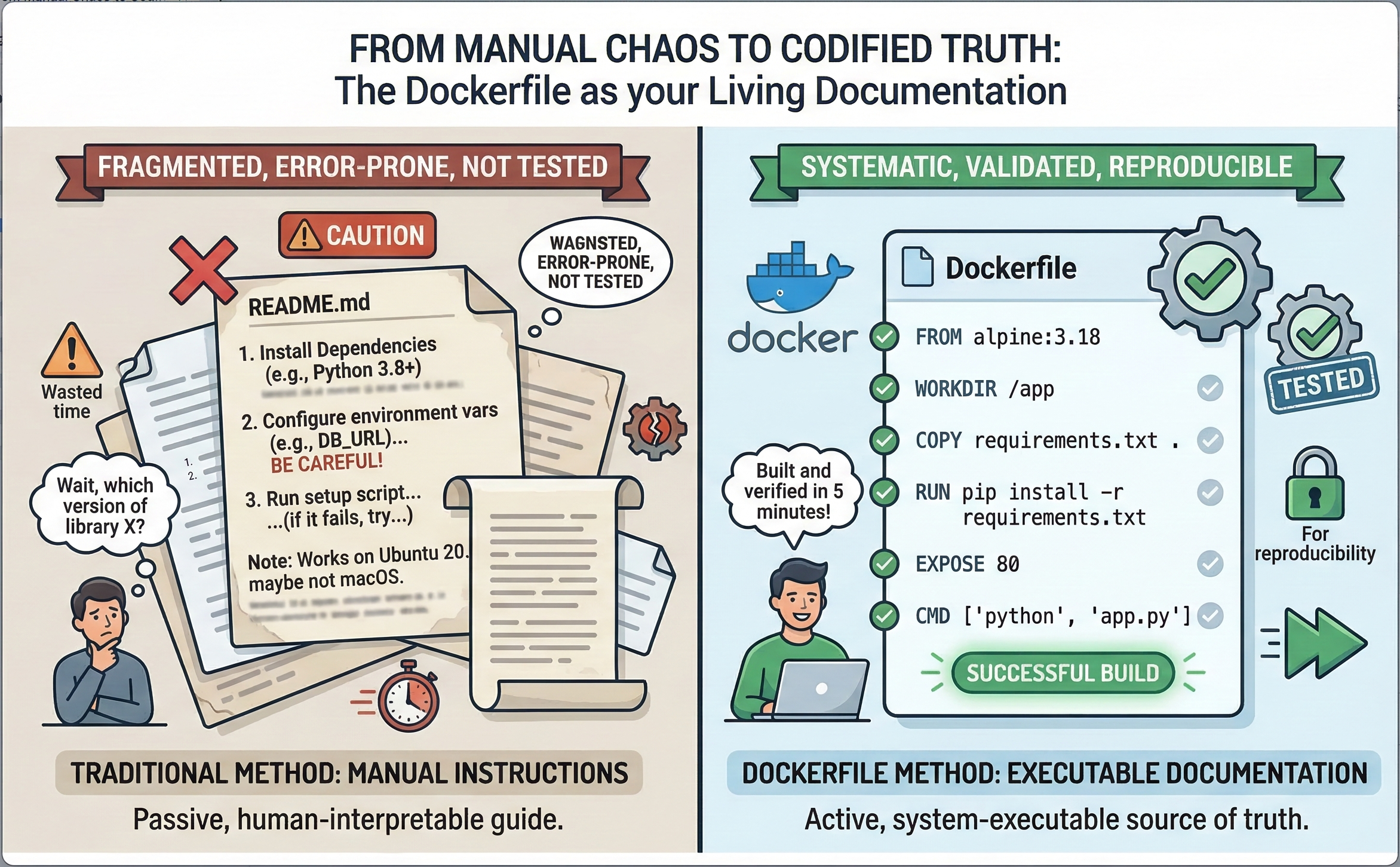
A scattered README tells a developer to "install dependencies" and "configure environment variables" with vague warnings like "BE CAREFUL!"—but it can never guarantee those instructions are current. A Dockerfile, on the other hand, builds and verifies in minutes and fails loudly if something is wrong.
The "Executable" Source of Truth
Traditional documentation is a suggestion; a Dockerfile is a mandate. When you document your setup process inside a Dockerfile, you aren't just writing instructions—you are writing executable documentation.
Unlike a PDF or a Wiki page, a Dockerfile is:
1. Environment-Agnostic
It defines the operating system, the dependencies, and the configuration in an isolated sandbox. It doesn't matter if your developer is on macOS and your production server runs Ubuntu—the Dockerfile is the equalizer. This eliminates the infamous "works on my machine" problem that has plagued software teams for decades.
2. Self-Validating
If a step in your installation process is broken, docker build will fail. This creates a built-in feedback loop that ensures your "setup guide" is always functional. No more stale wiki pages that silently drift from reality—your CI/CD pipeline will catch it immediately.
3. The Ultimate Reference
Want to know which version of Python the app uses? Check the FROM line. Need to see which ports are open? Check EXPOSE. Wondering what environment variables are required? Look at the ENV and ARG directives. Every operational detail is captured in a single, version-controlled file.
Learning Best Practices by Osmosis
One of the most underrated aspects of Docker is how it forces—and teaches—best practices. Because Docker encourages a lean, layered approach, writing a Dockerfile naturally leads you toward better architectural decisions.
Version Pinning
Instead of a vague "Install Node.js," you specify FROM node:20.11-alpine. This forces you to think about stability and reproducibility—two pillars of reliable infrastructure. Every dependency is explicitly declared, making your build deterministic and auditable.
Security by Default
Using the USER instruction reminds us not to run processes as root—a security fundamental often skipped in manual setups. Combined with multi-stage builds, you can ensure that build-time tools and secrets never leak into the final production image.
Layer Optimization
Learning to chain commands (e.g., apt-get update && apt-get install ...) teaches us about resource management and reducing image bloat. Each layer in a Docker image is cached, so understanding how to structure your Dockerfile directly impacts build speed and image size.
# Example: Optimized Dockerfile with best practices
FROM python:3.12-slim AS base

# Security: create non-root user
RUN groupadd --system app && useradd --system --gid app app

WORKDIR /app

# Dependency layer (cached separately from application code)
COPY requirements.txt .
RUN pip install --no-cache-dir -r requirements.txt

# Application layer
COPY . .

# Security: switch to non-root user
USER app

EXPOSE 8000
CMD ["gunicorn", "app:create_app()", "--bind", "0.0.0.0:8000"]
From "How-To" to "Standard-Of"
When a new developer joins the team, they don't need to spend two days wrestling with local dependencies. They run one command:
docker compose up --build
But more importantly, when they want to understand how the environment is constructed, the Dockerfile serves as a clean, step-by-step roadmap.
It bridges the gap between the Developer and the Operator. It turns tribal knowledge into version-controlled code. And because it lives alongside the application source code, it evolves with every pull request—never falling behind the way a separate wiki page would.
Dockerfiles in a CI/CD Pipeline
The real magic happens when Dockerfiles become the backbone of your continuous integration and deployment pipeline. Consider this workflow:
- Developer commits code — the Dockerfile is part of the repository
- CI server triggers a build —
docker buildvalidates every dependency and configuration step - Automated tests run inside the container — the exact same environment used in production
- Image is pushed to a container registry — a versioned, immutable artifact
- Deployment pulls the image — identical behavior across staging, QA, and production
At every stage, the Dockerfile serves as both the build instruction and the living documentation of the system. If a build fails in CI, the error message points directly to the broken step—no more guessing which manual instruction went wrong.
Practical Tips for Documentation-First Dockerfiles
To maximize the documentation value of your Dockerfiles, follow these guidelines:
- Comment your intent, not the syntax: Instead of
# Install curl, write# Required for health check endpoint probing - Use ARG for configurable values: This documents which parameters can be customized at build time
- Leverage LABEL for metadata: Add maintainer info, version, and description directly in the image metadata
- Adopt multi-stage builds: Clearly separate build-time dependencies from runtime dependencies, making it obvious what the production image actually needs
- Pin all versions: From base images to package versions—explicit is better than implicit
# Metadata as documentation
LABEL maintainer="engineering@iqaai.com"
LABEL version="2.1.0"
LABEL description="Production API server with health monitoring"

# Configurable build arguments (documented defaults)
ARG PYTHON_VERSION=3.12
ARG APP_PORT=8000
Final Thoughts
Stop looking at your Dockerfiles as just a packaging tool. Start treating them as the definitive, tested, and living documentation of your application's heartbeat.
If you want to know how a system truly works, don't look at the README—look at the Dockerfile. It's the only piece of documentation that is guaranteed not to lie to you.
The shift from manual chaos to codified truth isn't just a workflow improvement—it's a cultural change that pays dividends in onboarding speed, deployment reliability, and operational confidence. Your Dockerfile is more than a build recipe. It's your team's single source of truth.
Discussion0
Join the conversation. Sign in to leave a comment.